JavaScript: Local Scripts
· 4 min read
Over thirty years ago, JavaScript was introduced to the web. It provided the beginnings of a more interactive web: events, dynamic content, and on-page experiences.
However, it also introduced significant capabilities for ad-tech surveillance and user tracking. Fingerprinting can be done a number of ways without JavaScript (e.g. user agent, IP address), but JS by far offers the most lucrative and arcane methods of identifying users through subtle differences in browser behavior.
The open-source Fingerprint.js library lists 40 sources of entropy, including audio, canvas, color depth, cookies, fonts, math, plugins, timezone, and much more. This plethora of sources allows them to consistently identify users, which can be seen in the demo on their landing page.
Privacy-conscience users may choose to block JavaScript to avoid user-tracking. As it stands now, JavaScript can either be blocked entirely (through browser settings, or extensions like uBlock Origin), or not at all.
There is a lack of granularity for people who want to allow JavaScript for its interactivity or progressive enhancement, while keeping the surveillance out.
Exploring <script local>
#
An idea I’ve been tinkering with is to only allow scripts that do not make external requests. I call these local scripts.
<script local>
...
</script>A local script would block any external requests. The user could then be assured that none of their data can be collected via JS.
The following would be blocked:
fetchnavigator.sendBeaconXMLHttpRequest- Web sockets
- WebRTC
- ServerSentEvents (to the extent that the initial connection could send data to the server)
- Service Workers (same reason above)
- Submitting forms (via JS; user can still submit forms manually)
- Dynamic navigation (
window.location = '...')
<script local>
// ❌ Error: cannot use `fetch` in a local script
const response = await fetch(url, { body: get_user_fingerprint() });
</script>Additionally, any code run in a local script that would cause the retrieval of resources like images, stylesheets, or scripts, would be blocked:
<script local>
// ❌ Error: this would send a network request, possibly allowing user tracking and data exfiltration
const img = document.createElement('img');
img.src = `https://example.com/image.png?usr=${get_user_fingerprint()}`;
document.body.appendChild(img);

// ✅ OK: this would not cause a network request, so would be fine
const blobImg = document.createElement('img');
blobImg.src = 'data:image/png;base64,...';
document.body.appendChild(blobImg);
</script>Giving users more control #
When developers mark their scripts as local, they’re enabling users to run JavaScript with confidence. User agents and privacy extensions currently allow users to allow or block JS. Now they can provide a third option to allow local scripts:
( ) Allow all JavaScript
(x) Allow only local JavaScript (NEW)
( ) Disable JavaScriptTechnically the local attribute wouldn’t even be needed; a browser could introduce this third option regardless, and throw an error when any requests are made if the user has opted to use local JavaScript. Still, an attribute could be handy for identifying scripts that claim to conform to this new standard and aid in debugging.
Final thoughts #
This is the beginning of an idea, not a fully-vetted feature, so there are probably some things being overlooked.
The concept of running JavaScript as “all or nothing” seems lacking. It would be nice to allow JavaScript to run web-based tools or HTML5 games with the confidence that they shouldn’t be streaming personal data back to the server after the page loads.
For several years during the push to adopt HTTPS, web browsers helped users understand the security implications, kept them informed, and created pressure for sites to adopt HTTPS via aptly-placed warnings in the browser UI. Perhaps local scripts could do the same.
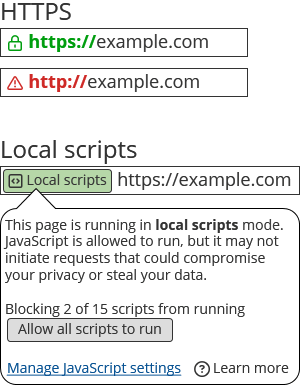
We can significantly curtail fingerprinting and enhance user privacy, while still keeping some of JavaScript’s benefits, by using local scripts.
Send me an email at greg@greglang.me!