Goodbye, Windows
· 4 min read
For all my life up until now, I’ve been a Windows user. My childhood introduced me to Windows 95, with that brutal yet nostalgic greenish-cyan desktop color. I then used Windows XP for quite a long time, probably the best of the Windows line.
My first laptop had Windows 7 installed that dazzled with the aero theme and a glowing boot-up screen, although with no significant enhancements over XP, at least not that I cared about (user account control was a nuisance, and I didn’t need parental controls). Windows 7, in my mind, marked the end of Microsoft seeing the operating system itself as the product - future OS’s would seek to hoover up data into Microsoft’s cloud and monetize the user.
I told myself at the time that Windows 7 would be the end of the line. But as 7 reached end-of-life, I begrudgingly upgraded to 10 (skipping over the poorly-received Windows 8). I had tried Ubuntu, but the user interface felt unrefined and overlooked, and for whatever reason the system ran sluggishly on my laptop.
Frustrations with Windows 10 and beyond #
With Windows 10 now end-of-life, however, I cannot upgrade to Windows 11. Windows 10 has already subjected me to:
- ads, news, and trivia on the lock screen
- daily desktop backgrounds (that are beautiful, but show me I’m not in control of my own computer)
- bloatware and garbage-ware installed by default, like Bejeweled, news apps, celebrity gossip, etc.
- pestering me to upload all my files to One Drive
- not respecting my defaults: opening new tabs in Edge rather than my default browser, Firefox
- a notifications pane/feature that doesn’t help me in any way
- tremendous amounts of telemetry
Windows 11 makes this worse:
- proposed ads in File Explorer
- mandatory usage of a Microsoft account
- files uploaded to One Drive, even without user consent
- “AI” integration that no one asked for
- updates that keep breaking the OS and software, including a patch that makes the PC unbootable
I made Windows 10 more tolerable using a debloater tool, but I’m done fighting my own computer.
The search for a new OS #
Over the years I kept bookmarks of possible replacement OS’s. Here are the top candidates:
- Linux Mint - heard good things about the UI and overall experience
- Ubuntu - one of the more popular Linux distros
- ReactOS - experimental, but definitely Windows-like
- CachyOS - supposedly a performant OS
- ZorinOS - familiar user interface to Windows, but it’s Linux
After some evaluation, and my desire for the choice to be similar enough to Windows, without actually being Windows, I decided upon Zorin OS, and I’m pleased!
Configuring Zorin OS #
To make the OS more Windows-like in appearance, I made the following tweaks.
Zorin Appearance
Fonts -> Default font size = 10 -> 12
Theme -> Other -> Icons = Adwaita
Windows -> Advanced window tiling = ✔ on
Desktop -> Icons = ✔ Home | ✔ TrashTaskbar settings
Margin = 0px
Border radius = 0px
Background opacity = Off
Panel thickness = 48 -> 54px
Desktop button = ✔ visible
Actions -> Click action = Toggle single / Preview multiple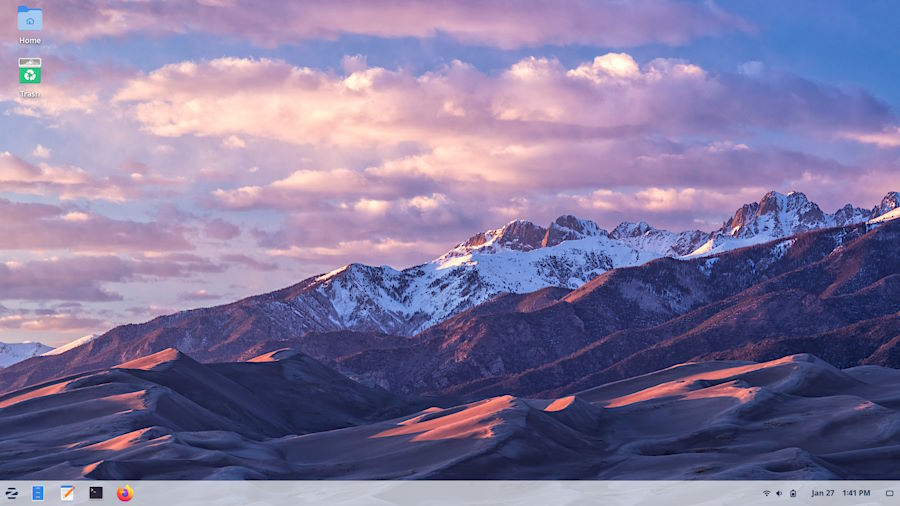
Goodbye, Windows #
It was only a matter of time before I left the Windows line. My departure was already belated when I missed the exit at Windows 7 → Win 10, but now it’s finally done.
I expected a learning curve and disorientation getting used to a brand new OS after all these years in the Windows ecosystem, but Zorin OS really shines because of the effort the team put in to making a seamless transition possible. And I didn’t anticipate the sense of relief I now feel, knowing that my computer is no longer designed against me, pushing changes against my will, collecting all my data, and surveilling my every action.
Goodbye, Windows! Hello, Zorin OS!
Send me an email at greg@greglang.me!